
Introduction
By 2026, a POS system will no longer just be a cash register, it will serve as the central hub of front-end retail data, connecting everything from inventory management and membership systems to online orders and real-time dashboards. This makes the All-in-One PC (AiO) an increasingly popular choice, offering a sleek large display and space-saving design all in one device.
This article breaks down how to choose, install, and maintain an AiO for POS use so your system stays stable, fast, and ready to grow with your business.
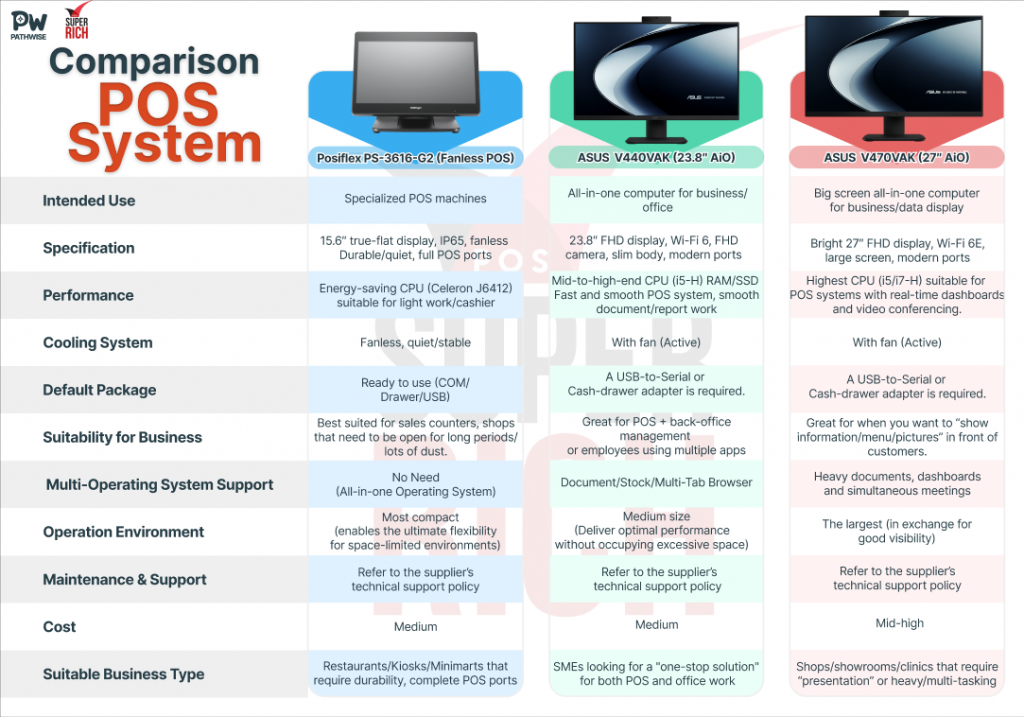
1. Comparison Table
2. Choosing the Right Specs for Your Business
Your ideal AiO depends on your main use case:
- General Front-End Work (cafés, minimarts): Models like the Posiflex PS-3616-G2 or a 23.8-inch AiO (ASUS V440VAK) are more than sufficient. For heavy-duty 24/7 use in dusty or high-risk environments, Posiflex is the best option thanks to its fanless design.
- More Demanding Operations (restaurants, offices): Go for an AiO with a mid-range CPU such as an Intel i5-H and 16GB RAM. This ensures smooth multitasking across POS systems, reports, and inventory management.
- Customer-Facing Use (showrooms, clinics): A 27-inch AiO (ASUS V470VAK) offers a larger screen that can be split between menus, promotions, or dashboards alongside the POS system—perfect for presentation and customer engagement.
3. Stable Software Setup
A reliable software foundation is key:
- Operating System: Windows 10 or 11 is recommended for stronger security.
- POS Application: Choose software that supports offline operation (offline queue) so orders can still be processed even if the internet goes down. For example, Super Rich POS (SRPOS) continues handling orders and recording sales seamlessly.
- Security Settings: Use Kiosk Mode or Assigned Access to limit staff access only to necessary applications and reduce the risk of errors.
4. Connecting Peripherals for Maximum Stability
- Connectivity: Make sure the AiO has enough ports for all peripherals, including receipt printers (USB/LAN recommended for reliability), cash drawers, and barcode scanners.
- Adapters for Legacy Devices: If you’re using older hardware with RS-232 or RJ11 ports (e.g., cash drawers), prepare a USB-to-Serial adapter or cash-drawer adapter in advance.
5. Tips to Keep Your POS Reliable and Ready Anytime
- Maintenance: For counters near kitchens or dusty areas, fanless AiOs like Posiflex are quieter and more reliable.
- Power Backup: Install a UPS (Uninterruptible Power Supply) to prevent data loss during power outages and configure auto-shutdown in case of low power.
- Data Security: Set clear update policies to avoid mid-operation restarts, and back up sales data daily to Cloud or NAS storage.
Conclusion: Which Model Should You Choose?
- Posiflex: Best for businesses needing maximum reliability, high-risk counter environments, or full POS connectivity.
- ASUS V440VAK: Ideal for SMEs seeking a single device that handles both POS tasks and general office needs.
- ASUS V470VAK: Perfect for flagship stores, showrooms, or clinics that benefit from a large display to enhance customer experience and deliver rich presentations.